A treatment is the physical answer to the problem - the part was repaired on site, returned to the supplier, accepted under concession. It is not the root cause and not the corrective action; those belong to a CAPA. One NC can carry several treatments, because real repairs rarely take one step.
Recording a treatment needs update_nc on an NC you raised or are assigned to, or manage_any_nc on anyone's.
Adding one
Open the NC and add the treatment from the Treatments panel. The options are your tenant's own list - T1 return to HQ, T4 repair on site, and so on - so pick the one that matches what happened rather than the one that sounds closest.
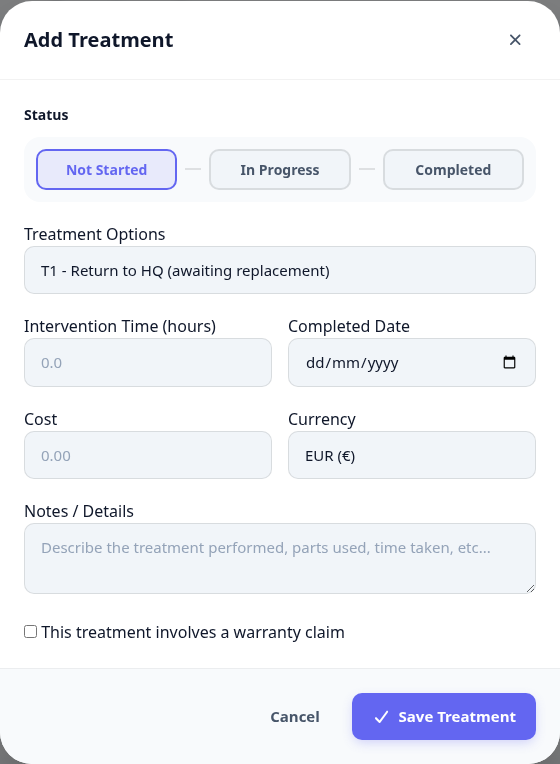
Open the NC and find the Treatments panel.
Add a treatment and choose the option that describes what was done.
Set its status: Not started, In progress, or Completed.
Record the intervention time in hours and the cost, if there was one.
Write in the notes what was actually done, in a sentence someone else could follow.
Tracking them
The panel shows every treatment on the NC with its status bar, so a half-finished repair is visible without opening anything.
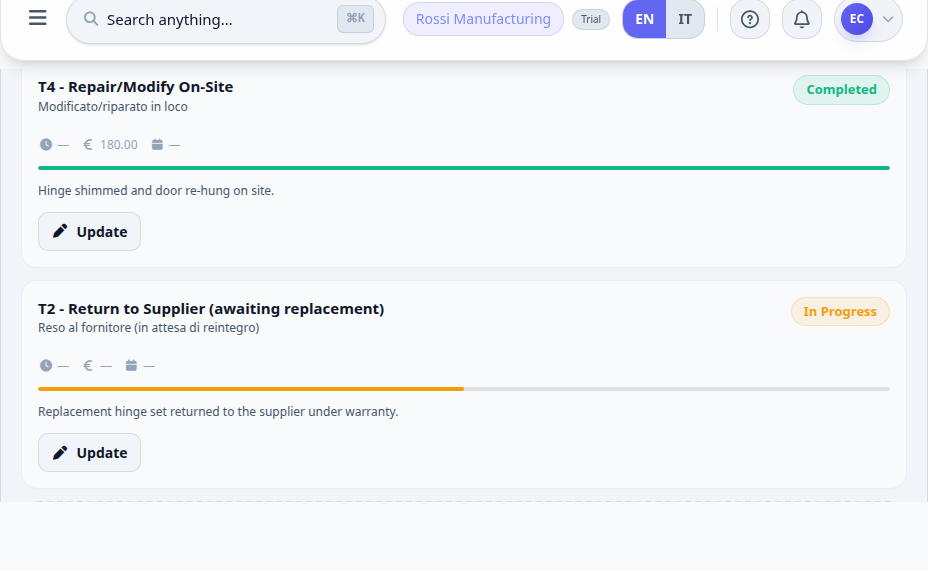
An NC cannot be closed while any treatment is still open. If closing is refused, a treatment here is the reason.
What happens next
Completed treatments are what allow the NC to be resolved and then closed.
Intervention time and cost roll up into the module's KPIs and into the supplier's record where the NC names one.
If the same treatment keeps recurring across NCs, that is the signal to open a CAPA.
Next: close it out.